Optimising your website for search engines and ensuring a smooth, intuitive experience for your visitors are two sides of the same coin when it comes to online success. As a UK-based SEO expert, I consistently see businesses struggle not just with keyword stuffing or link building, but with the fundamental architecture of their site. A well-structured website isn’t just good for Google; it’s essential for converting browsers into paying customers. This article delves into the practicalities of structuring your website to achieve both superior SEO performance and an outstanding user experience.
Before we dive into the ‘how’, let’s briefly touch upon the ‘why’. Your website’s structure acts as a blueprint, guiding both search engine crawlers and human users through your content. Think of it like a carefully organised library. If books are haphazardly scattered, it’s frustrating for visitors and impossible for a librarian (Google) to categorise effectively.
How Structure Impacts SEO
From an SEO perspective, a logical website structure offers several key advantages:
- Improved Indexing and Crawling: Search engine bots efficiently navigate well-structured sites, discovering and indexing your content quicker. If your content is buried several clicks deep, it’s less likely to be found.
- Enhanced Site Understanding: A clear hierarchy helps search engines understand the relationships between different pages and the overall context of your website’s content. This contributes to better topical authority.
- Internal Link Distribution: Good structure naturally facilitates internal linking, spreading “link equity” (PageRank) across your site. Important pages receive more internal links, signalling their significance to search engines.
- Reduced Duplicate Content Issues: A defined structure often helps prevent issues where search engines might perceive multiple URLs for the same content, which can dilute ranking signals.
The User Experience Benefit
For your users, the benefits are equally profound:
- Ease of Navigation: Visitors can quickly find what they’re looking for, reducing frustration and abandonment rates. A clear menu and intuitive pathways are paramount.
- Increased Engagement: When users can effortlessly explore your content, they’re more likely to spend longer on your site, visit more pages, and engage with your offerings.
- Improved Conversion Rates: A seamless user journey, from discovery to conversion, is directly influenced by how well your site is structured. Frustrated users rarely convert.
- Brand Credibility: A professional and easy-to-use website reflects positively on your brand, building trust and authority.
For those looking to enhance their website’s structure for improved SEO and user experience, it may also be beneficial to explore the implications of website management and security, as highlighted in a recent article about a cryptocurrency exchange facing significant challenges. The article discusses how the sudden loss of a founder has left the company unable to repay clients, underscoring the importance of robust website security and management practices. You can read more about this situation in the article here: Crypto exchange says it can’t repay £190 million to clients after founder dies with only password.
Designing Your Site Hierarchy: The Pyramid Approach
The most effective website structure typically resembles a pyramid or a tree. At the very top sits your homepage. Below that are your main category pages, and further down, the sub-category pages and individual product/service/blog posts. This hierarchical arrangement creates a logical flow.
Mapping Your Content
Before you even start building, or if you’re looking to restructure an existing site, conduct a thorough content audit.
- Identify Core Topics: What are the main subjects your website addresses? These will form your primary category pages.
- Group Related Content: Cluster individual pieces of content under their relevant categories. For example, if you sell ‘Men’s Shoes’, sub-categories might be ‘Trainers’, ‘Boots’, ‘Formal Shoes’, etc.
- Consider User Intent: How would a typical user search for and expect to find this information? Structure your site to mirror these mental models.
Flat vs. Deep Structures
Generally, a flatter structure is preferred. This means that users (and search engine crawlers) can reach any page on your site within a minimal number of clicks, ideally no more than three or four from the homepage. A deeply nested structure, where content is many clicks away, can hinder crawling and frustrate users.
- Benefits of a Flatter Structure: Improved crawlability, better internal link equity distribution, and enhanced user experience due to quicker access to content.
- When a Deeper Structure Might Be Necessary: For very large e-commerce sites with thousands of products, some level of depth is unavoidable. However, diligent internal linking and clear navigation become even more critical in such cases.
Implementing Logical Navigation for Both Bots and Humans
Your website’s navigation is the primary interface for guiding users and crawlers. It needs to be clear, consistent, and comprehensive.
The Power of Your Main Menu
Your main menu (often in the header) should list your primary category pages. These are the most important sections of your site.
- Keep it Concise: Avoid overwhelming users with too many options. Aim for 5-7 main menu items if possible.
- Descriptive Labels: Use clear, keyword-rich labels that accurately describe the page content. Avoid jargon or overly clever terms. “Services” is clearer than “Our Offerings.”
- Consistent Placement: Ensure your main menu is in the same prominent position on every page.
The Utility of Breadcrumbs
Breadcrumbs are secondary navigation elements, usually found at the top of a page, that show the user’s current location within the site hierarchy. For example: “Home > Blog > SEO > This Post.”
- Improved User Orientation: Breadcrumbs help users understand where they are and easily navigate back up the hierarchy.
- Enhanced SEO: Search engines love breadcrumbs because they provide clear pathways and reinforce site structure. Schema markup can be applied to breadcrumbs to offer even richer information in search results.
- Clickable Path: Ensure each segment of the breadcrumb trail is a clickable link to the corresponding higher-level page.
Footer Navigation
While often overlooked, the footer provides another opportunity for navigation. It’s an ideal place for:
- Secondary Links: Pages like “About Us,” “Contact,” “Privacy Policy,” “Terms and Conditions,” or links to subsidiary sites.
- Category Overviews: For very large sites, a sitemap-like list of main categories in the footer can be useful.
- Consistency: The footer should be consistent across all pages.
Internal Linking: The Glue of Your Website
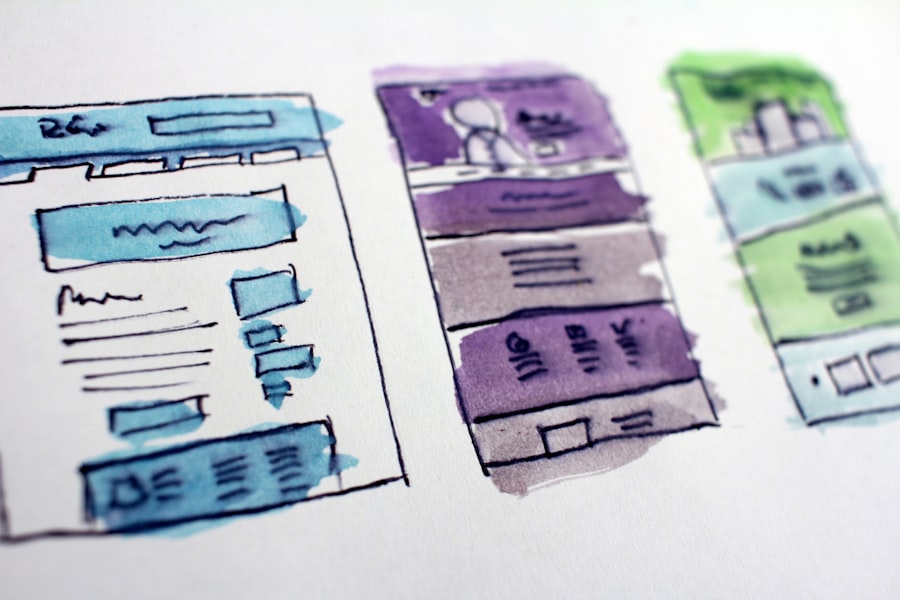
Internal linking isn’t just about SEO; it’s about connecting related content for the benefit of both users and crawlers. It reinforces your site’s structure and helps distribute authority.
Principles of Effective Internal Linking
- Relevance is Key: Only link to pages that are genuinely relevant to the content of the originating page. Don’t force links.
- Descriptive Anchor Text: Use keyword-rich and descriptive anchor text (the clickable text) that accurately reflects the content of the destination page. Avoid generic “click here” or “read more.”
- Strategic Placement: Place internal links naturally within your body copy where they add value to the reader. Also, consider “related posts” sections.
- Avoid Over-linking: While internal links are good, an excessive number can dilute their impact and make content difficult to read.
- Deep Linking: Wherever appropriate, link not only to main category pages but also directly to sub-category or individual content pages. This helps distribute link equity deeper into your site.
The Role of Hub Pages
For content-heavy websites, hub pages (also known as pillar pages) are fantastic for both SEO and user experience. A hub page provides a comprehensive overview of a broad topic and then links out to many more detailed sub-pages (cluster content) that delve into specific aspects of that topic.
- Topical Authority: Hub pages signal to search engines that your site is an authority on a particular subject.
- User Navigation: They serve as a landing point for users interested in a broad topic, allowing them to explore related sub-topics easily.
- Internal Link Powerhouse: Hub pages naturally attract many internal links from their cluster content, passing significant link equity to them.
When considering how to structure your website for better SEO and user experience, it is also beneficial to explore additional resources that can enhance your understanding of search engine optimisation. For instance, an insightful article on maximising SEO with Google Webmaster Tools can provide you with valuable tips and strategies to further optimise your site. You can read more about it here. This comprehensive guide will complement your efforts in creating a user-friendly and search-engine-friendly website.
Technical Considerations for Structure and Performance
Beyond the user-facing aspects, several technical elements contribute to a well-structured and high-performing website. These ensure that search engines can accurately interpret and rank your content.
URL Structure
Your URLs should be clean, descriptive, and reflect your site hierarchy. They are another clue for search engines and users about the content of a page.
- Readable and Logical: Use hyphens to separate words (e.g.,
yourwebsite.com/category/product-name). Avoid underscores or random strings of characters. - Keyword Inclusion: Incorporate relevant keywords where natural, but avoid keyword stuffing.
- Shallow URLs: Aim for shorter URLs that logically follow your site’s hierarchy (e.g.,
yourwebsite.com/mens-shoes/trainers/nike-air-max). - Canonical Tags: If you have identical or very similar content accessible via multiple URLs (e.g., due to filtering or parameters), use canonical tags to tell search engines which URL is the preferred, authoritative version. This prevents duplicate content issues.
XML Sitemaps
An XML sitemap is a file that lists all the important pages on your website, helping search engines discover and understand your site’s structure.
- Guidance for Crawlers: It acts as a roadmap for search engines, ensuring they don’t miss any critical pages, especially on large sites or those with complex structures.
- Regular Updates: Ensure your sitemap is up-to-date, reflecting any new pages or changes to existing ones.
- Submission to Search Consoles: Submit your XML sitemap to Google Search Console and Bing Webmaster Tools.
- Prioritisation and Change Frequency: Sitemaps can include information about the “priority” of pages and how frequently they are expected to change, though search engines generally treat these as hints rather than directives.
HTTPS and Mobile Responsiveness
While not directly ‘structure’ in the traditional sense, these are fundamental technical elements that deeply influence how search engines perceive and users interact with your site. Without them, even the best structure can falter.
- HTTPS (SSL Certificate): Security is a ranking factor. Ensure your entire site uses HTTPS (indicated by a padlock in the browser bar). This encrypts data transferred between the user’s browser and your server, making your site more secure and trustworthy. Browsers actively warn users about non-HTTPS sites, severely impacting user experience.
- Mobile Responsiveness: A significant portion of web traffic now comes from mobile devices. Your website must adapt seamlessly to different screen sizes and orientations. Google operates a mobile-first indexing policy, meaning they primarily use the mobile version of your content for indexing and ranking. A non-responsive site will suffer significantly in search results and provide a terrible user experience.
When considering how to structure your website for better SEO and user experience, it’s also essential to think about the role of web hosting in this equation. A reliable hosting service can significantly impact your site’s performance and loading speed, which are crucial factors for both search engines and users. For insights on selecting an excellent web host, you might find this article on choosing a great web host particularly helpful. By ensuring your website is well-structured and hosted effectively, you can create a more engaging experience for your visitors while improving your search engine rankings.
Auditing and Iterating Your Website Structure
Website structure is not a ‘set it and forget it’ task. It requires ongoing review and optimisation. As your business evolves, your content grows, and user behaviour shifts, your structure may need adjustments.
Regular Site Audits
Schedule regular technical SEO audits to identify any structural issues.
- Broken Links: Use tools to check for broken internal and external links. Broken links frustrate users and waste crawl budget.
- Crawl Errors: Monitor Google Search Console for crawl errors (e.g., 404s). Address these promptly.
- Redirects: Clearly manage 301 redirects for any pages that have changed URLs to preserve link equity and guide users. Avoid long redirect chains.
- Page Speed: While not purely structural, page load speed significantly impacts user experience and SEO. Optimise images, leverage browser caching, and consider a Content Delivery Network (CDN).
Gathering User Feedback
Quantitative and qualitative data about user behaviour can highlight structural weaknesses.
- Analytics Data: Tools like Google Analytics can show you popular pages, bounce rates, exit pages, and user flow, indicating where users might be getting lost or abandoning your site.
- Heatmaps and Session Recordings: These visual tools (e.g., Hotjar, Crazy Egg) show you where users click, scroll, and spend their time, revealing navigation challenges.
- User Testing: Directly observe real users attempting to complete tasks on your site. Their feedback is invaluable for identifying areas of confusion.
- A/B Testing: Experiment with different navigation layouts or category names to see which performs better in terms of engagement and conversions.
In conclusion, structuring your website for both SEO and user experience is a foundational element of any successful online strategy. By implementing a logical hierarchy, intuitive navigation, robust internal linking, and sound technical practices, you create a website that not only pleases search engines but, more importantly, genuinely serves your audience. This meticulous approach ensures that your content is discoverable, your users are engaged, and your overall online presence is primed for sustained growth and success.
FAQs
1. What is the importance of structuring a website for better SEO and user experience?
Structuring a website for better SEO and user experience is important because it helps search engines understand the content and purpose of each page, leading to higher rankings. It also improves user experience by making it easier for visitors to navigate and find the information they need.
2. What are some key elements of a well-structured website for SEO and user experience?
Key elements of a well-structured website include clear and logical navigation, a hierarchical structure with categories and subcategories, internal linking, mobile responsiveness, fast loading times, and relevant, high-quality content.
3. How can a website’s structure impact its SEO performance?
A website’s structure can impact its SEO performance by influencing how search engines crawl and index its pages. A well-structured website makes it easier for search engines to understand the content and relevance of each page, leading to better rankings in search results.
4. What are some best practices for structuring a website for better SEO and user experience?
Best practices for structuring a website for better SEO and user experience include conducting keyword research to inform the site structure, creating a clear and intuitive navigation menu, using descriptive URLs, organising content into categories and subcategories, and ensuring fast loading times.
5. How can website structure impact user experience?
The structure of a website can impact user experience by making it easier for visitors to find the information they are looking for, navigate between pages, and understand the overall layout of the site. A well-structured website can also improve accessibility for users with disabilities and enhance overall satisfaction with the site.
